
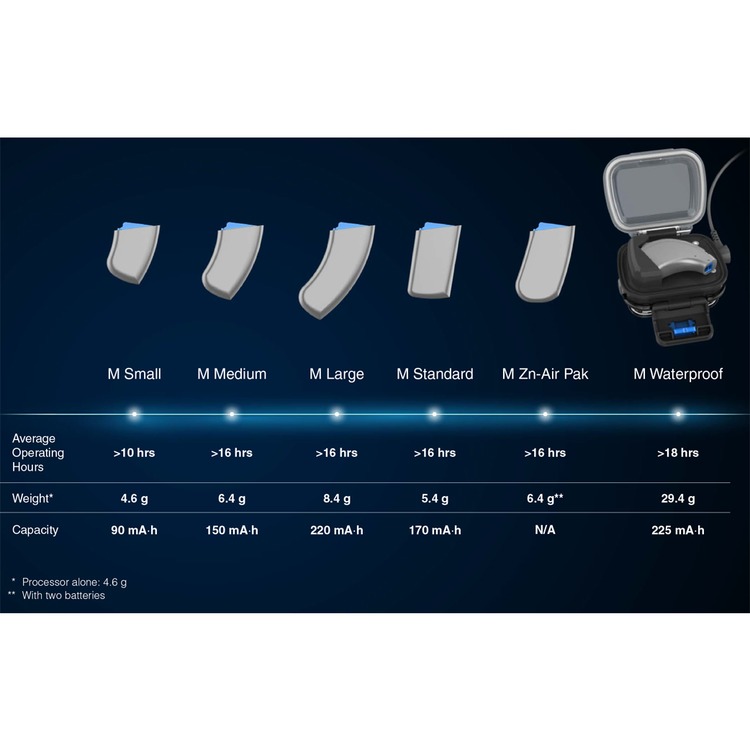
Advanced Bionics M Zn-Air Battery Pack for Marvel Processors
Code: DCAB5501
-
VAT
Choose quantity and options
Please allow around a working week for dispatch of this product
Description
The M Zn-Air Battery Pack allows you to use disposable batteries with Advanced Bionics Naída™ CI M and Sky CI™ M Sound Processors.
The type of disposable batteries to be used with the M Zinc-Air Battery Pack are 675 power implant batteries (P675). Regular 675 hearing instrument batteries will not be powerful enough for a cochlear implant. The suggested type is PowerOne P675 Implant Plus batteries. Two batteries are required at a time.
Available in a choice of colours. (Batteries are not included.)
Comes with a single lockable (tamperproof) battery drawer.
Manufacturer pt no: CI-5501
Note - these are the updated design as of the end of 2026 and are not subject to the previous recall
Details
Instructions:
1. Using the same tool provided for the M T-Mic™ microphone or M Earhook removal and replacement, insert the pointed end of the tool into the small hole located on the spine of the Zn-Air cartridge. With the tool inserted in the hole, gently push in and downward until you feel the Zn-Air drawer release and pop out the button of the Zn-Air cartridge. If you do not have the tool present, any thin, pointed device should work to release the drawer. From here you can grasp the Zn-Air drawer with your hand and gently pull it the rest of the way out.
2. Remove the Zn-Air cells from their package, making sure to remove the sticker from the flat positive (+) side of the cell. Removing the sticker allows air to enter and activate the battery, so be sure to use the battery immediately after peeling off the sticker.
3. Place two Zn-Air cells, positive (flat) side up, in the two openings in the battery drawer.
4. Once batteries are flush with the top of the battery drawer, gently slide the battery drawer back into the battery cartridge. If the cells are inserted incorrectly, the battery drawer will not close.
5. Then begin to attach the battery cartridge to the Naída CI by holding the sound processor in one hand. Rotate RF cable upward to avoid bumping it upon battery placement.
6. Align the battery cartridge connector with the processor housing side of the connector.
7. Slide the battery onto the processor until you feel it click into place.


